
The main purpose of Roles is to allow for efficient communication to groups of people, and to manage access to areas within the Manage Team admin console based on role permissions.
» Note: Volunteer management, including jobs and shifts, is only available to Premium customers.
Covered in this Article:
|
➧ Accessing Roles |
|
Roles are managed from the Roles tab in the Manage Team console. |
➧ Roles VS Jobs/Shifts |
|
Roles are different from Jobs in a number of ways, primarily having to do with time span—does it take place over the whole season or what is the level of responsibility? Roles DefinedAt its simplest, a Role is a job that lasts all season, possibly done by the same person at each event. Coach, Treasurer, President, and so on. But a Role is also a group, so more than one person can be assigned to it—it can be for any grouping of parents that you need. Committees, Board Members, people who have paid to not volunteer… Another use for a Role is if your league requires training for volunteers for some jobs. Roles can be used in the recipients of communication as well. Jobs/Shifts DefinedJobs are things that need to be done at a meet or event. Jobs have shifts, which determine when and who performs the task. For example, you might have a job “Age Group Parent” with shifts for each age group that needs wrangling & how many such wranglers are required for each age group. If your team splits shifts, i.e., there are early and late shifts, those are just additional shifts. |
➧ Types of Roles |
Committee/Coordinator RolesSuch as Coach, President, Treasurer, Website Admin, Sponsor Coordinator, Age-Group Parent Coordinator, Snack Bar Coordinator, Computer Rep, Announcer etc., which is usually filled by only one or two people and are not usually reset at the end of each season (as long as these individuals wish to continue with their roles). These roles are usually configured to be exempt from volunteering. Season RolesSuch as Timer, Ribbons, Tent Parent, Concessions, Stroke/Turn Judge etc., which are related to working a shift at an event; is filled by many people; and is usually reset at the end of each season. Teams usually only create "Roles" for these when collecting preferences during registration. Otherwise, jobs & shifts posted to each meet is used for signup during the season. ➞ See the Jobs and Shifts tutorial for more info. Role Required for Job SignupPREMIUM This feature is available to our Premium customers.Some jobs require training before a person can sign up for them. One example of this is Stroke/Turn Judge. Some teams create a Role like "New Parents" to assign new parents to, and set up the easier jobs where you have to be assigned to this role to be able to sign up. Volunteer Exempt RolePREMIUM This feature is available to our Premium customers.Teams that add a paid "Volunteer Opt-Out" acknowledgement to their registration form, create this role to automatically assign those people who buy their way out of volunteering. Some teams assign their committee/coordinators to this role instead of creating separate roles for each position. Assignment to the Role allows them to meet all minimum volunteer requirements. Acknowledgements RoleSuch as Photo Release or Rookie Parent, where agreeing to an Acknowledgement on the registration form assigns a person to a role for identification and communication.
|
Creating Roles |
➧ Step 1: Click "New Role" button |
➧ Step 2: Define the Role Details |
|
Enter the name of the role, a description, and determine if the role assignment is seasonal or persistent from season to season. 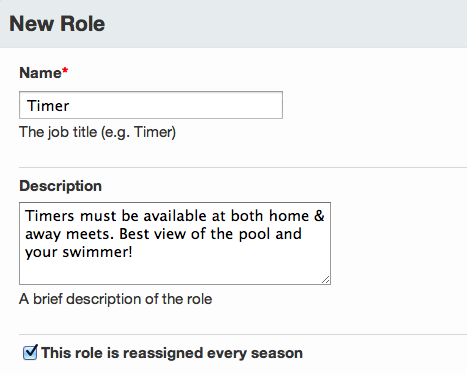 Seasonal RolesIf "This role is reassigned every season" is checked: the person assigned in the current season is removed when the season is updated, and the role only displays on the seasons the person is assigned. The assignment is more of an intentional decision by an admin or maybe a Volunteer Coordinator from season to season. Persistent Roles (multi-season)If "This role is reassigned every season" is NOT checked: the person remains assigned to the Role automatically when the season is updated, and the label displays on every season (past, present, future). Leaving this unchecked is beneficial to people who stay in a Role for many seasons, so they can access the areas they need to without a website admin having to reassign them each season. If anyone should not be assigned the next season, you'll need to remove them manually, so they will not get emails or access to areas they should not have. » Tip: If it's a multi-season role, leave this box unchecked. You can change this setting as long as no one is assigned to the role. If anyone is assigned, you must create a new role. |
➧ Step 3: Define the Role Requirements |
|
Next, enter the total number of people usually needed in this role during the entire season 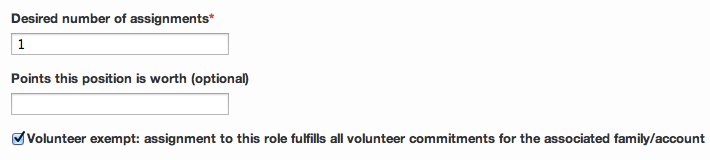 PREMIUM The features below are available to our Premium customers.Role PointsDetermine how many points (if tracking) are given for members assigned to this Role, and if members assigned to the role are exempt from further volunteering. Volunteer Exempt SettingMembers assigned to volunteer-exempt roles are allowed to skip the volunteer preference and job sign-up section during registration. Some teams allow parents to pay a fee to opt out of volunteering. You can create a "Volunteer Opt-Out" role that can be marked exempt to create a volunteer opt-out option in theAcknowledgements section of the registration form. Be careful with this if you think many parents will gladly pay, so you're not left with a volunteering issue. Make the fee high enough to deter it. » Points Tip: The points setting is useful for teams that use points to determine volunteer commitment minimums by one person for the same job done over an entire season. BUT, requiring points based on job/shift signup during registration is handled separately. The system does not know someone is assigned to a Role outtside of registration unless the role is marked as "Volunteer exempt." So, even if someone is assigned to a role worth X points, they will still need to fulfil your points requirement during registration. Either make the role exempt or create a separate registration form with a different point requirement for these people. It can be a private form if you want to just send it to them directly. (Volunteer management, including jobs and shifts, is only available to Premium customers.) |
Role Management |
➧ Using Roles for Communications |
|
Assigning people to Roles allows you to make communication groups, or to limit who can sign up for jobs (available to Premium customers) when you create a meet or an event. Once you have assigned volunteers to roles, you can send group emails based on the "Role" name. Using "Roles" in communication will simply email anyone assigned to that role who has an email address. If you add an athlete, it will email that athlete (if they have an email). If you add a parent, it will email that parent (if they have an email). For more details on how communication works with Role Assignees, ➞ See the Role Assignees section of our Communications article. |
➧ Role-Based Permissions |
|
You can assign customized administrative permissions to each role, which can provide access to separate admin sections of your site. Any users assigned to that role will inherit the administrative permissions defined in that role. ➞ See Role-Based Permissions for details to set your permissions appropriately for each role you create. |
➧ Role Assignment and Restricting Access Based on Assignment |
|
Any parent or athlete on your team can be assigned to a role, so that you can group the people on your team, from assigning meet jobs to sending group emails. Restricting Access Based on Role Assignemnt (i.e., Job Signup, Web Page Editing...)You can also define a job as requiring that a parent be assigned to a role before they're allowed to sign up for that job, and you can optionally assign specific roles to each web page to grant permission to edit the page. Learn how to assign volunteers to your Roles. ➞ See Assigning Volunteers to Roles |
Training Videos |
➧ How-To Overview: Creating and Managing Roles (7min) |
|
➞ direct link to our Creating and Manageing Rolesvideo. |
➧ Workshop Webinar Recording (54min) |
| For an in-depth workshop on defining and managing your roles, ➞ watch our recorded webinar: ▶️ Training Video – Roles |
hcmanageroles hcmanagerolesnewrole hcmanagerolesassignroles
Comments
0 comments
Please sign in to leave a comment.